Showing posts with label eye. Show all posts

Monday, October 8, 2012

Link your Website to your Google+ Page.

It's Google+ time again and SocialEyes has another important tip in furthering your successful internet marketing campaign.  

Today we are going to discuss linking your website to your Google+ Page! This is extremely important as this function will make your Google+ page eligible to show up on the right hand side of the Google search page for relevant search queries and make your Google+ page more discoverable.

By adding a short line of code to your website's html you can verify and link your website to your Google+ business page (This is not your personal profile but your page under your personal profile).

Do it yourself or ask your site's webmaster to add the line of code provided by Google to your website's homepage.
After you are finished it will take a few days to start showing up but once it does; BAM your page becomes much more visible!
Follow the simple below:
1. Go to your Google+ page, click on the about tab, scroll down and click the "link website" button. (Make sure your profile contains your website first. If not click edit profile and add your website.)


2. Copy the code provided in the box. 


3. Take the code and either add it yourself or ask your site's webmaster to add the line of code provided in the box to your website's homepage.


4. Once the code is added to your website click the "test website" button.


5. If done properly you should get the "Test Successful" message. Click done and hold on tight while your practice jumps to the top of the search results!

Thank you!

Thursday, September 20, 2012

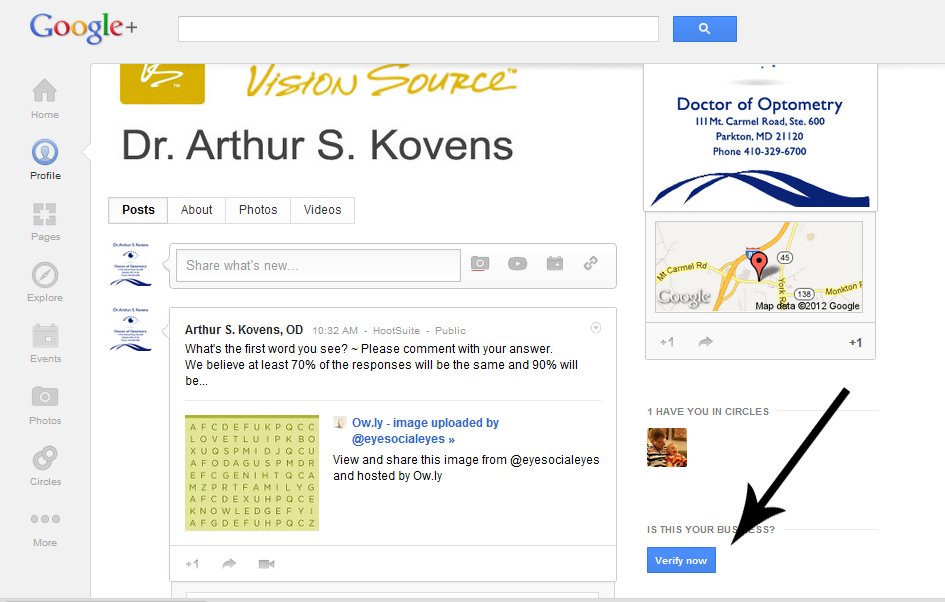
Steps to verify your Google+ Page.


Have you verified your Google+ Page yet? By verifying your Google+ Page it allows you to connect it to your Google+ Local Page. As you can see here http://bit.ly/VeoBh7 my Google+ Local listing (The one where people write reviews) is now connected to my Google+ Page (Think of it as Facebook for Google). You can see my posts and review me as well.

Go to your Google+ Page and follow the easy steps below!
 
1. Click "Verify".


2. Choose your Google+ Local listing and Click "Yes Let's Continue"


3. Click "Yes Let's Continue".


4. Click "OK" They will send a postcard with a Pin Number to your Office.


5. Once you receive the Pin Number go to your Google+ Page, click "Enter Pin" and Enter your Pin.


6. Voila! You are now Verified!

Wednesday, September 19, 2012

Optimize your Youtube Video for the Search Engines.

We often forget that YouTube is the second largest search engine in the world. Being a site that hosts videos, we tend to miss the fact that a lot of people also use YouTube as a search engine to find what they want and need. These are the people who like to consume content in the form of video and are usually more qualified buyers and subscribers than the visitors from search engines.
A few years back, if you posted a video on YouTube with the relevant keyword in the title, it would rank in the top 10 results easily. But nowadays there are so many videos being uploaded in YouTube that YouTube SEO has become as important as website SEO. As an added bonus, one can optimize their YouTube videos and move their rankings up in YouTube search result pages just like in Google search results.
Many marketers have talked about YouTube SEO so I will start with the most elusive concepts first and then I will cover the frequently talked about tips as well.

1. Closed Captions

While watching YouTube videos you would have noticed a button ‘CC’ in the bottom right corner. CC stands for closed captions. YouTube is becoming global now and videos created in India are being watched and shared by people in US; videos from Europe are reaching people in Sri Lanka and so on. Captions not only enable more people to consume your video but YouTube also crawls the content in the captions! This has been proved by many experiments where we include a unique text string inside the captions file and when that string is searched on Google or YouTube the video will come up!
Earlier it used to be a complicated process to add CC to a video – one would need to specify the start and end time of each line and it would take hours. But recently YouTube introduced a speech recognition technology/feature which automatically detects the start and end of each line spoken and matches it to the video’s audio. So all you need to do is upload the script of the video and the captions will appear exactly in sync with the video. It is amazing how YouTube does this – but it is also the reason they are the No.1 in this market.
So a video on a topic with CC should definitely outrank the video on the same topic with no CC provided other SEO factors have also been taken care of.

2. Adding the Script in the Description

If you are creating the script for the speech in video, then adding the same script in the description of the video shouldn’t take much time. Google indexes this as well.

3. Naming the Video File with Keywords

If you are uploading a video about the ‘Health Benefits of Organic Foods’ then the file name of the video should be something like organic-food-benefits.avi or something similar. MOV0234.AVI is not going to be meaningful. The viewer of the video does not look at this but YouTube gives a relevancy credit to the file name because if your file name is named with your keyword then there is a better chance that your video is about what it says.

4. Create a More Engaging Video

This probably sounds straight forward and simple and you may even be tempted to skip this paragrapgh – BUT WAIT. I am about to say something which will blow you away.
YouTube gives relevancy credits to videos where people watch it for a longer time. This is not just a theory but has been tested by us. We uploaded two videos with almost the same SEO factors built in but the only change was the perception by the real human visitor. One video was engaging and the other video was not engaging to the real humans. 6 months later the more engaging video was ranking much better than the other video. So yes, YouTube gives credit to videos which are more engaging because it is a good way to measure the quality of the video.
For the purposes of guarding my niche from competition, I cannot reveal the videos I tested – so if you have a hard time trusting me, you can ignore this fact at your own risk.

5. Authoritative YouTube Channel

If you are posting a video on a fresh YouTube channel it is not going to have as much SEO power as the same video uploaded on a channel with has a lot of other good videos on the same topic. This is similar to website SEO – Posting an article in a fresh blog vs. posting an article in a high PR established blog makes a difference between heaven and hell.
Not only the video would get better rankings, but it will grow faster when the subscribers of that YouTube channel like, comment and share that video.
So always try to have established youtube channels for each of your niche and avoid posting videos on fresh channels. Also avoid posting irrelevant videos in the channels – it may dilute the SEO power of all the other videos on that channel.

6. Posting HD Videos Instead of SD

It is astonishing how many marketers do not even mention about uploading HD videos. Again this has been tested by us in several occasions. HD videos out-rank standard definition videos every time.
You may think that YouTube may not prefer HD videos because it costs them a lot of storage space and bandwidth – but they have more resources that you can imagine. The reason why they limit the length of the videos is not because of lack of storage or bandwidth but to prevent people from uploading copyrighted videos. This has been confirmed by YouTube itself.
It makes sense that a HD video should be better than a standard video. If someone is investing the energy and resources in creating a HD video then the content could be equally good.
So try to upload 1080P videos whenever possible and if you are doing screen cast or presentation videos – 720P should do the job.
Some of the other commonly talked about SEO methods are
  • Having a relevant headline with proper keywords
  • Putting your link in the description above other content with http://
  • Including tags from other videos which rank well for the keywords that you are targeting
  • Giving a call to action at the end of the video for liking your video and/or subscribing to your channel.
Hope you found my insights useful. Please leave you comments.

Monday, August 27, 2012

Google + and Google + Local for the Eye Care Professional?

Does an Optometrist, Ophthalmologist, Optician or Vision Therapist need to have a presence on Google + and Google + Local?

Absolutely, and here's why.

Roughly 60% of your patients use Google to find your practice when they are in  need of Eye Care. I am willing to bet that most Eye Care Professionals do not even know that Google has done away from the Google Places page? Are you even familiar with the new Google + Local for your business?

Google + and + Local are the biggest trending topics online these days. So, what is it and why should you care about it? Simple –  Google + is a new social media site that is directly tied into the most widely-used search engine on the planet, with looming search engine optimization (SEO) implications. If you care about your company’s online reputation – what consumers are saying and where they are saying it – you need to read this post.

If you used Google’s search engine in the last year, you may have noticed a strange development – a little “+1” button that would show up in search results. Clicking on it would indicate to Google that you have endorsed that result as a solid source of information for the search term you used. Naturally, everyone speculated that the more +1 clicks that a site received, the higher that Google would esteem it for that particular search term. Google denied this at +1’s implementation but did not dismiss the possibility of +1 affecting search rankings in the future – which means it will be a reality soon enough.

With G+ using the +1 button as a way to endorse a post by a contact, the overall vision for +1 is revealed to be a bit grander. Google envisions +1 as the tool that ties together all user-endorsed content across the web. Whether you +1 something in search results or a photo that your friend took of his dog and uploaded to Google+, you’re contributing to your personal version of Google’s search algorithm, meaning that content may eventually be served to you differently based on your +1 behaviors.

This concept is very bold and presents an interesting problem for SEO management, if it does indeed create a personalized set of results which varies wildly for every user. When the SEO community reaches some sort of consensus (or if Google releases more information) then I’ll do a follow-up to this post on how +1 affects Google+ SEO performance.

Here is how to get started:

Create your profile
To create a Google+ page, an Eye Care Professional first needs to have a personal profile on Google+. You can login using your Google account if you already have one. If you don’t have a Google account, it’s very quick and easy to join. Start now.

Create a page
Google+ can help people learn about what makes your business tick -- your products, promotions, hours and anything else an Eye Care Professional wants to share. If your location is important, for instance, add a map to your Google+ page that directs customers right to your doorstep. Keep that information up to date and make it easy to find through Google+ searches.

Grow your circles
Whenever people follow you, you can add them to your circles. They’ll also begin to see your posts in their stream. So spread the word and encourage people to add you. You can even get the Google+ badge to let people add you to a circle without leaving your site here.

Google+ Tips

Add your Google Plus  Profile ID to the following:

LinkedIn Profile (Hint: Use the Website Section in your Profile)
Twitter Profile (Hint: Create a short url link)
Personal Blog or Website (Hint: WordPress has Code- Widgetsplus)
Facebook Profile (Hint: Use the Website Category)


Google + Local 

Google Places have been swallowed up by Google+ Local Pages, merging all business listings into one to be used across search, Maps, mobile, and Google+.

Users can access enhanced local listings via a new Local tab in the left sidebar of Google+, by performing searches on the fly on their mobile (currently supporting Android, iOS coming soon), in Google searches, and through Maps.

One notable addition: Zagat’s reviews are incorporated, taking the place of Google’s five-star rating system. Google purchased Zagat’s last year and working the review system into Google+ Local has taken down the paywall, making the service free for all users.

Here’s how it works, demonstrated in a video released by Google.

The new format will be rolling out to all users “in the weeks and months ahead,” Google VP Engineering Jen Fitzpatrick wrote in the blog post announcing the change. Business owners are still able to manage their information through Google Places for Business, though now the listing will surface through a number of Google services.

Different people are interested in different parts of your business. Whether it's breaking news, updates, promotions, links, photos - even talking face-to-face with groups via easy-to-use video chat - Google+ lets you easily share the right things with the right customers.

Help word get around. Put the +1 button anywhere you'd like people to be able to recommend your business, products or services to friends and contacts all across the web.

Do you want to capture 50% to 60% of the people searching for eye care in your area?

Here is what to do:

1. Claim Your Listing.
2. Add Information About Your Business.
3. Upload Photos.
4. Add Videos.
5. Solicit Reviews.
6. Create an Offer.
7. Promote it on Your Website and Social Media sites.
8. Optimize the Keywords on Your Website.
9. Create Backlinks to Your Website.
10. Create Address and Phone Number Citations on the Web.

Happy Googling !

Recent Posts